Anatomy of a Google Vishing Attack: Email Forensics, Bounce Domain Abuse, and the Social Engineering Layer
A real-world forensic breakdown of how attackers weaponize Google's own bounce infrastructure to bypass every email security check.

The phone rang on a Saturday afternoon.

"Hello, this is Google Support. We've detected an unauthorized request to recover your Google account. For your security, we've assigned a dedicated representative to assist you. I'm sending you a verification email right now.”
I earned my Ph.D. in Cyber Operations and have spent over two decades in the industry. And I'll admit: for about three seconds, the call felt real. The caller was calm, professional, and had clearly run this script before.
Then my analyst brain kicked in.
What followed was a textbook multi-stage attack combining vishing (voice phishing), email spoofing, and Google infrastructure abuse into a coordinated campaign. The most interesting part? The second email I received passed every authentication check — SPF, DKIM, and DMARC — because the attacker wasn't faking Google. They were weaponizing it.
This is a full forensic breakdown. Let's go.
The Attack: Two Emails, One Phone Call
The attacker sent exactly two emails. Everything else was social engineering layered on top of them.

The first arrived at 15:53:13 — a fake "Assigned Representative" email, designed to look like a Google security alert. The second arrived at 15:53:45 — a completely legitimate Google security notification, actually sent by Google's own servers, informing me that a recovery email had been modified on an account called wey485125@gmail.com.

That's the entire technical attack surface: one fake email and one real one. The phone call was the glue that made both of them land.

Email 1: The Fake — "Assigned Representative"
This is the attacker's own email. Let's pull it apart.
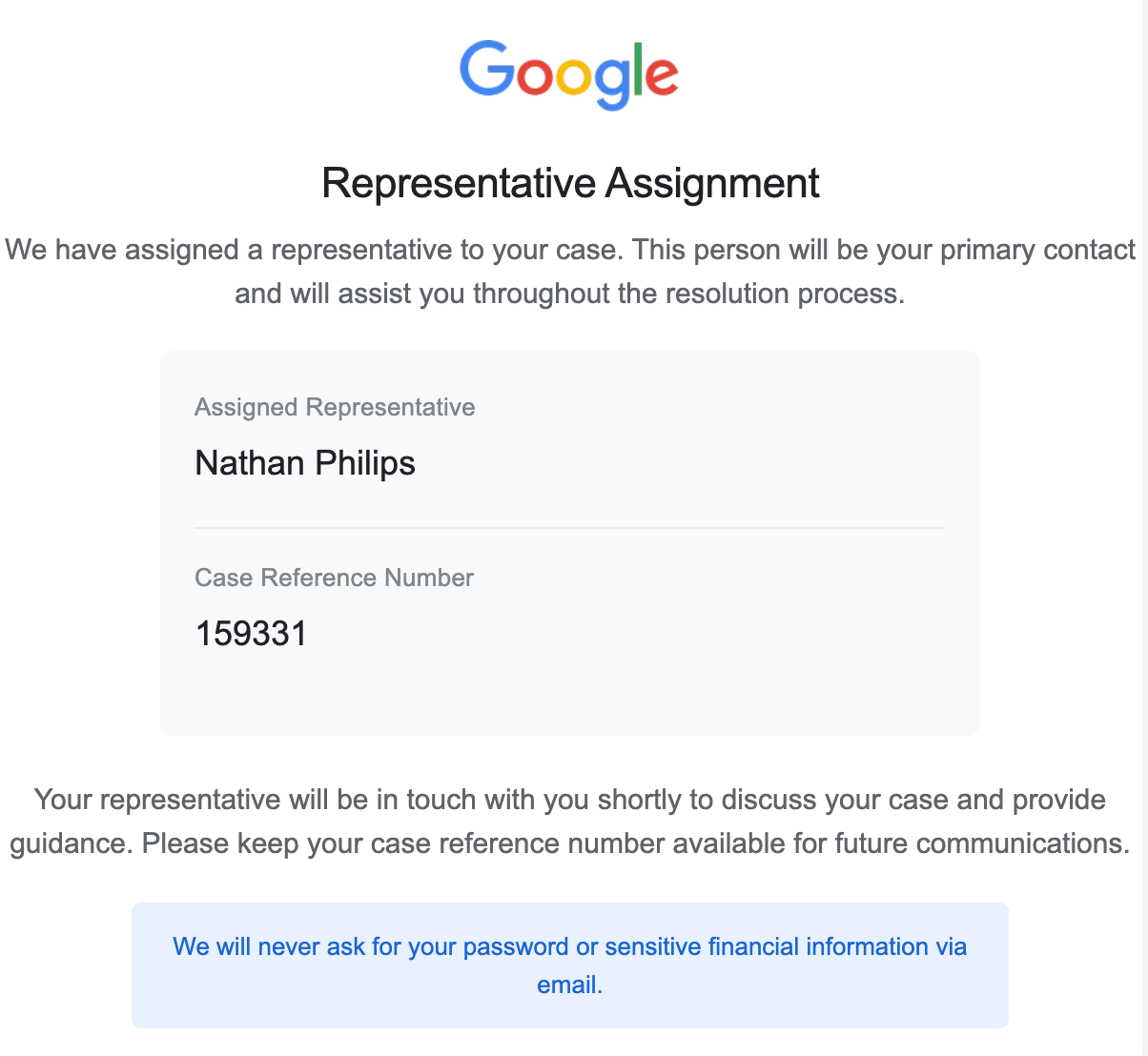
The phishing email renders cleanly with Google branding. Nothing looks obviously wrong at first glance.
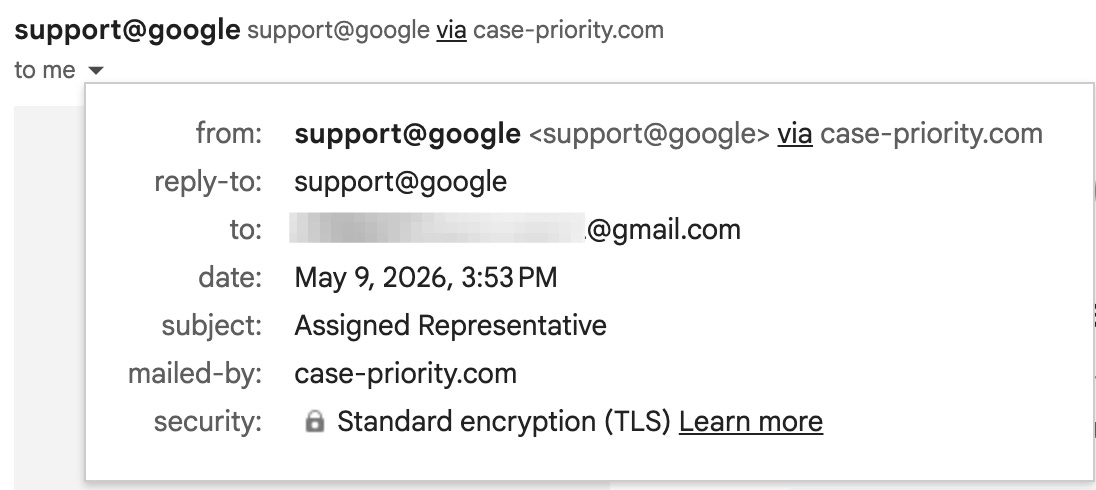
The From field lie
Click the sender name in Gmail, and it shows this:
From: support@google
Reply-To: support@google
Notice anything? support@google is not a valid email address. Google's actual support emails come from @google.com, @accounts.google.com, or @no-reply.google.com. There is no @google top-level domain. This is a display-name trick — Most email clients show the friendly name, not the raw address, and to a casual reader "support@google" looks completely legitimate.
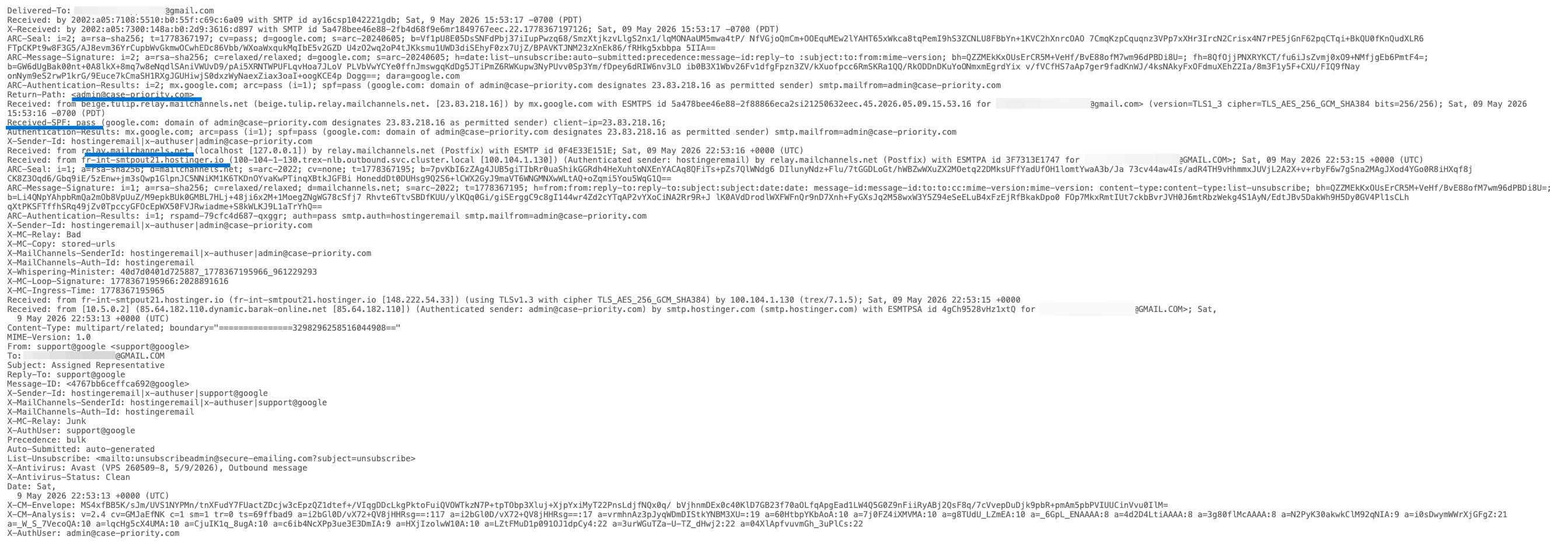
The Real Sending Infrastructure
In Gmail, open the email, click the three-dot menu, and select Show original. Here is what the headers actually say for the:
Return-Path: admin@case-priority.com
Received: from beige.tulip.relay.mailchannels.net [23.83.218.16]
Received: from fr-int-smtpout21.hostinger.io [148.222.54.33]
Received: from 85.64.182.110.dynamic.barak-online.net [85.64.182.110]
    (Authenticated sender: admin@case-priority.com)
    by smtp.hostinger.com
The real picture
- Real sender: admin@case-priority.com — the attacker's domain, hosted on Hostinger
- Origin IP: 85.64.182.110 — a dynamic IP on barak-online.net, an Israeli ISP
- Relay chain: Hostinger → MailChannels → Google's inbox
MailChannels is a legitimate transactional email relay service. It is also frequently abused for exactly this kind of campaign — it adds a layer of legitimacy to the sending path while obscuring the true origin.
The Unsubscribe Trap
List-Unsubscribe: unsubscribeadmin@secure-emailing.comThe unsubscribe address has nothing to do with Google. This is a confirmation harvesting address. If you click it, you confirm your email is active and monitored. The domain name is designed to sound authoritative — it isn't.
Why SPF Passes and Why That Doesn't Help
spf=pass smtp.mailfrom=admin@case-priority.comSPF passes here — because case-priority.com legitimately authorized Hostinger and MailChannels to send on its behalf. But SPF does not verify what the From header says. It only verifies the envelope sender — the hidden MAIL FROM field used during SMTP transmission. The From header you actually see in your email client is a completely separate field that SPF never touches.
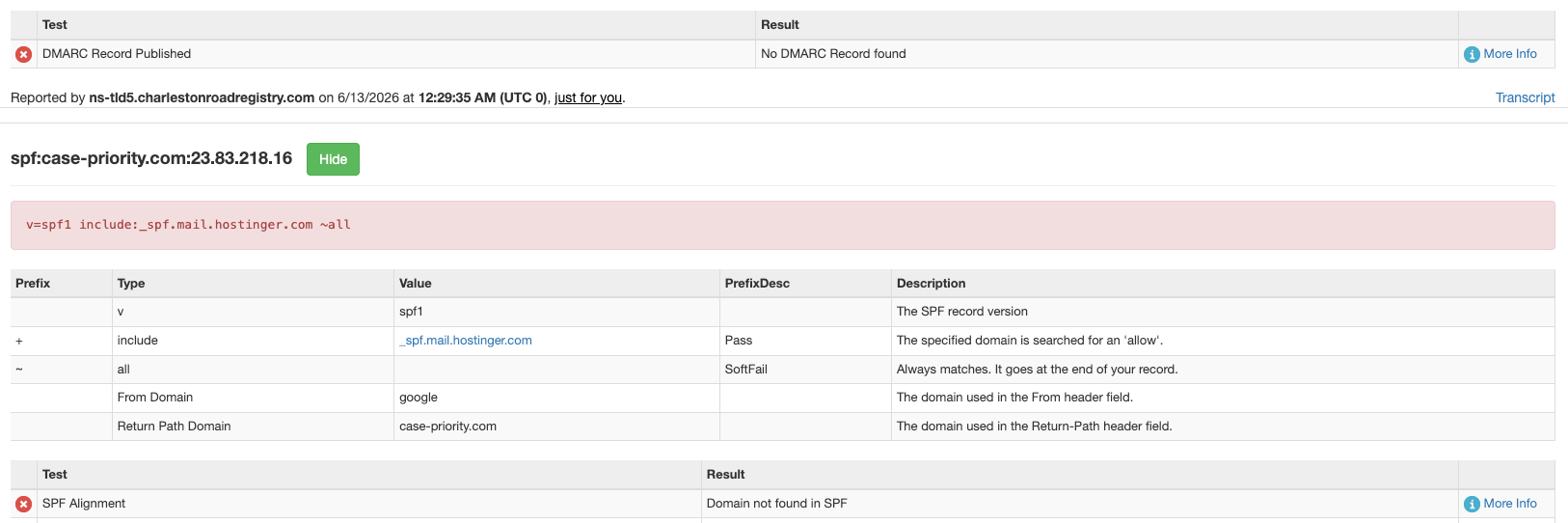
MXToolbox confirms what the raw headers suggest. It flags SPF alignment failure — the From domain (google) has no relationship to the authenticated sending domain (case-priority.com). It also reports no DMARC record for case-priority.com, meaning the attacker's domain has no enforcement policy whatsoever. A domain with no DMARC is a domain built for abuse.

This is one of the most persistently misunderstood limitations of email authentication, and attackers rely on it constantly. SPF passes. But MXToolbox flags the mismatch between the From domain and the Return-Path domain. That gap is exactly what the attacker exploited.
Email 2: The Clever Part — Weaponizing Google Itself
This is where the attack gets genuinely sophisticated.

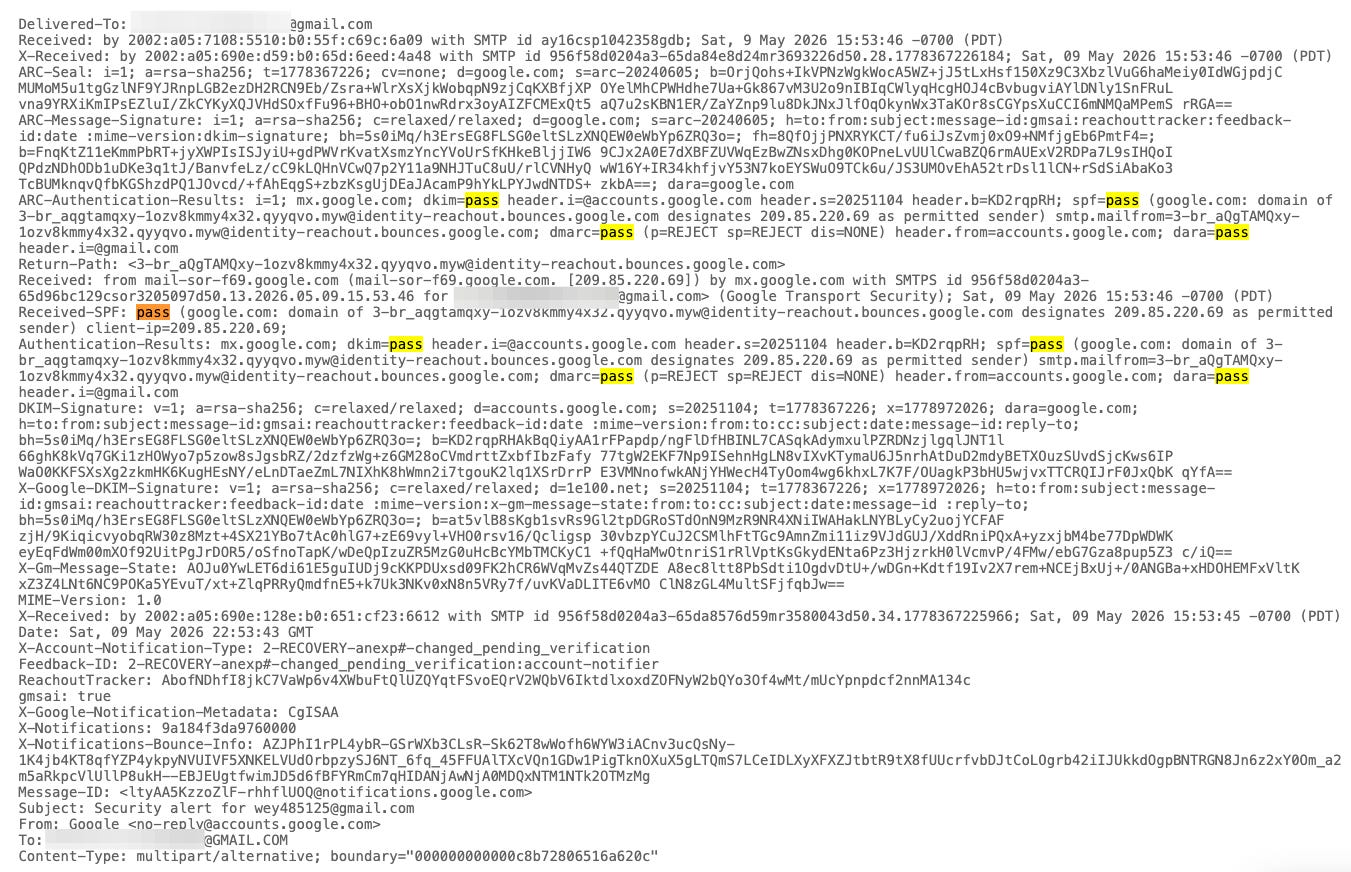
Email 2 is not a fake. It is not spoofed. Google actually sent it. Every header is clean:
DKIM: pass (header.i=@accounts.google.com)
SPF: pass (via gaia.bounces.google.com)
DMARC: pass (p=REJECT sp=REJECT)
Return-Path: 3-br_aQgTAMQxy-1ozv8kmmy4x32.qyyqvo.myw@identity-reachout.bounces.google.com
From: Google no-reply@accounts.google.com
Sent directly from mail-sor-f69.google.com — one of Google's own outbound mail servers.
What the Attacker Actually Did
The attacker controlled a throwaway Google account — wey485125@gmail.com — and added my email address as the recovery contact for that account. Google then automatically sent me a security notification about the change to the listed recovery address. The subject line makes this explicit:

Subject: Security alert for wey485125@gmail.com

And the body:
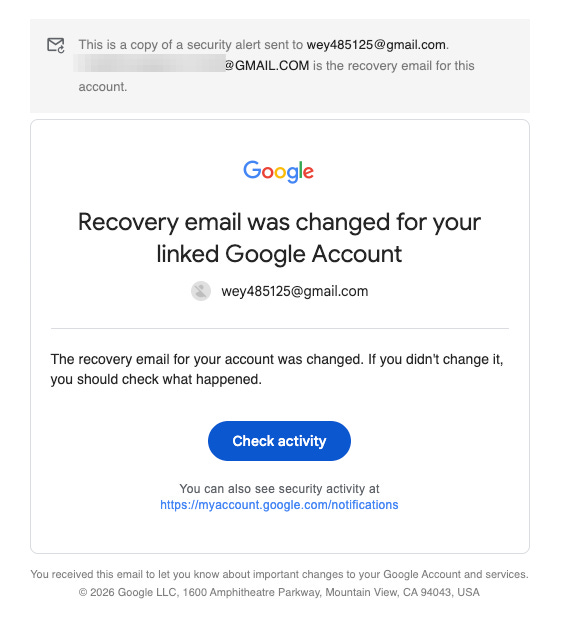
The smoking gun. This alert is for someone else's account. The attacker added me as their recovery contact to generate an authentic Google notification in my inbox.
The Bounce Infrastructure
The Return-Path on this legitimate Google email reads:

3-br_aQgTAMQxy-1ozv8kmmy4x32.qyyqvo.myw@identity-reachout.bounces.google.com

This is Google's internal bounce-handling infrastructure — the same system used by Google Forms, Google Drive sharing notifications, and Google Workspace alerts. The gaia.bounces.google.com domain is whitelisted by essentially every spam filter on the planet.

The attacker never needed to fake anything. Generate real Google email traffic by manipulating Google's own account recovery flows. No spoofing. No DKIM bypass. The email is completely authentic — the deception is entirely contextual.
The Social Engineering Layer
Without the phone call, receiving a security alert for wey485125@gmail.com is just a confusing email you'd ignore or delete. The phone call is what transforms a confusing notification into a credible emergency.

The caller's script follows a precise psychological sequence:

1. "Your account is under attack" — establishes urgency and fear
2. "We've assigned you a dedicated representative" — creates false authority and personal connection
3. "I'm sending you a verification email right now" — primes you to expect, watch for, and trust what arrives next

When the real Google alert lands in your inbox seconds later, showing an account modification, you read it as confirmation that the attacker is actively doing something to your account right now. The manufactured urgency makes you want to act immediately rather than think critically.

The next instruction would have been: "Click the link in the email to verify your identity and secure your account." That link goes to a credential harvesting page. Password entered. 2FA code entered. Account compromised.
How I Verified My Account Was Safe
I did not click anything in either email. I opened a fresh browser tab and navigated manually to accounts.google.com. Four checks, in this order:

1. Recent activity — myaccount.google.com/notifications — no suspicious logins
2. Recovery email — myaccount.google.com/security — my actual recovery address was unchanged
3. Connected devices — no unfamiliar devices
4. Third-party app access — no new OAuth grants

Everything was intact. The alert was for wey485125@gmail.com. My account had never been touched.
Red Flags at a Glance
The three signals that matter most: a From address with no valid TLD, a Return-Path pointing to a domain you've never heard of, and a security alert that's addressed to someone else's account. Everything else is confirmation.
MITRE ATT&CK Mapping: Where This Attack Sits on the Kill Chain
This attack maps to two MITRE ATT&CK techniques. The fake "Assigned Representative" email is a textbook T1566.001 — a targeted spearphishing email crafted for a specific individual, designed to deliver a malicious link under the cover of a legitimate-looking sender. The weaponization of Google's account recovery notifications to generate authentic alerts in my inbox falls under T1598.003 — using a trusted third-party service (Google itself) as the phishing delivery mechanism. Both techniques sit at the very beginning of the ATT&CK kill chain, under Initial Access and Reconnaissance — this attack never needed to touch my system. It only needed to touch my psychology.
Closing Thoughts
What makes this attack effective is not its technical sophistication — it is narrative engineering. The attacker does not break Google's security. They manufacture a story that makes you want to hand over your credentials voluntarily.

The phone call is the setup. The fake Assigned Representative email is the lure. The legitimate Google alert is the false confirmation. And you — panicking, clicking, typing your password into a harvesting page — are the exploit.

The defense has not changed: slow down, verify independently, and treat urgency as a signal to be more careful, not less.

Stay skeptical. Read your headers.
I publish technical write-ups on real-world attacks, malware analysis, and forensics at SecBytes. If this breakdown was useful, subscribe below — new posts go directly to your inbox, no algorithm involved.